Combine Video with Audio Online - Free, No Upload
Merge any audio with any video. Replace or mix original sound. MP4 in seconds.
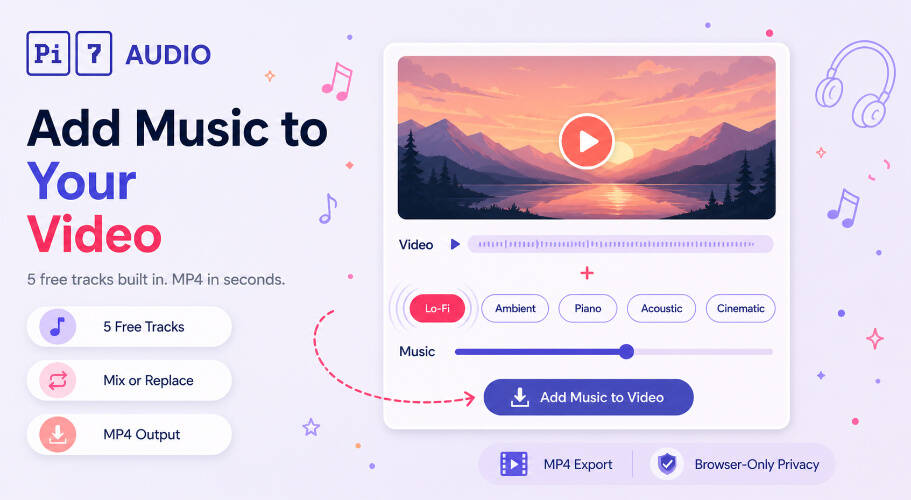
Pi7 Combine Video with Audio merges any video file with any audio track inside your browser. Replace the video's existing sound with new audio, or mix new audio underneath the original with independent volume controls. Pick from 5 built-in royalty-free tracks (Lo-Fi, Ambient, Soft Piano, Acoustic, Cinematic) or upload your own MP3, WAV, M4A, OGG, FLAC, or OPUS file. The video stream is never re-encoded, so processing finishes in seconds rather than minutes - no quality loss, no waiting.
No upload to any server, no signup, no watermark. Output is a clean MP4 with AAC audio (128, 192, 256, or 320 kbps) that plays in any modern browser, phone, or social platform.
How to Combine Video with Audio in 3 Steps
- Drop or select your video file (MP4, MOV, MKV, WEBM, AVI, 3GP, M4V supported)
- Pick a built-in audio chip (Lo-Fi, Ambient, Piano, Acoustic, Cinematic) or upload your own audio file. Click Play to preview the track before you commit.
- Pick Mix with Original or Replace Original, set the volume sliders, and click Add Music to Video. The MP4 result appears in the page and downloads with one click.
Need to pull audio from another video first? The extract audio from video tool gets it out cleanly. Need to trim a long audio file before merging? The audio cutter handles that in seconds. Want to record voice over a music bed together instead? Use the audio recorder with background music.
Two Modes: Replace or Mix the Original Audio
- Mix with original audio keeps the video's existing audio (voice-over, dialog, ambient sound) and layers your new audio underneath. The original-audio volume slider lets you set how much of the original to keep. Default for vlogs, tutorials, and any video that already has spoken content worth preserving.
- Replace original audio drops the original audio entirely. Use for silent footage (drone, B-roll, security cam), videos with unusable audio (wind, clipping, room noise), or when you simply want a clean music-only soundtrack.
If your audio is shorter than the video, the loop checkbox auto-fills the duration. If it is longer, it auto-cuts at the video's end. You can also trim the audio (start/end seconds) and the video (start/end seconds) in Advanced, plus apply a master fade in / fade out for a polished open and close.
Five Free Audio Tracks Built In
Five royalty-free tracks ship with the tool, ready to drop into any video without sourcing your own:
- Lo-Fi (Easy Lemon): mellow chill bed, perfect for casual vlogs and lifestyle content
- Ambient (Atlantean Twilight): melodic atmospheric pad, great for nature footage and slow-motion scenes
- Soft Piano (Gymnopedie No 1): Erik Satie's calm piano, ideal for reflective or emotional moments
- Acoustic (Wholesome): warm folk acoustic, fits family videos, weddings, and storytelling
- Cinematic (Inspired): uplifting orchestral feel, great for inspirational intros and recap videos
You can also upload any audio file as your own custom soundtrack. Supported formats: MP3, WAV, M4A, AAC, OGG, FLAC, OPUS.
When to Merge Audio with a Video
- Social shorts: join audio and video to make a TikTok, Instagram Reel, or YouTube Short with a soundtrack
- Wedding and event highlights: score a memory video without paying a videographer
- Vlog B-roll: add a music bed under cutaway shots while the main voice-over carries the story
- Drone and travel footage: re-soundtrack silent clips with cinematic music
- Fitness and tutorial videos: upbeat bed under instructions or demonstrations
- Family videos: birthdays, holidays, baby milestones with warm acoustic music
- Marketing and promo clips: combine a video clip with a polished audio bed for product or service marketing
- Slideshow videos: turn a photo slideshow video into a finished memory piece by joining audio
- Voice-over to footage: merge a separately-recorded voice-over track with on-camera footage
Zero Upload Pipeline - Your Video Is Edited Right Here
Your privacy is at the heart of how we build. We do not upload your video. We do not store it. We do not see it. If your file is sensitive - a wedding clip, a family moment, a confidential pitch - it stays where it was: on your device.
Video files are big. Upload-based editors charge a fee partly because the bandwidth alone is expensive for them. Pi7 sidesteps that economy entirely - your video is read locally by FFmpeg compiled to WebAssembly, the new audio track is muxed into the file inside this browser tab, and the only network activity is fetching the built-in music chip you picked (a few megabytes at most). The video itself never travels to a server.
The user-facing version of that architecture: no signup, no email, no waiting on an upload bar that takes longer than the actual processing. Drop a video, pick the music, click Add Music to Video, and the result appears in the same page where you can play it back or download it. Close the tab and nothing remains anywhere.
Because the video stream is muxed without re-encoding (only the audio is rebuilt as AAC), processing is dramatically faster than typical online editors that re-render every frame. And since no shared backend exists, you can process as many videos as you want, the export has no Pi7 watermark, and the tool works offline once the page is cached.
Frequently Asked Questions
Will the video quality change after combining with audio?
No. The video stream is never decoded or re-encoded. Pi7 only swaps and mixes the audio track, then remuxes the file. The picture quality, resolution, frame rate, and bitrate of your output match the original exactly. Only the audio is rebuilt as AAC at your chosen bitrate (128, 192, 256, or 320 kbps).
What audio formats can I merge with my video?
Any common audio format works as input: MP3, WAV, M4A, AAC, OGG, FLAC, OPUS. The output audio is always re-encoded to AAC inside an MP4 container for universal browser, phone, and social platform compatibility. Pick the AAC bitrate in the Advanced section.
Start Combining Video with Audio Now
Drop a video, pick an audio track, hit Add Music to Video, and grab your result in seconds. Fast, free, and fully private - only in Pi7 Audio Tool.